ML engineering · 10 min read
20,953 Pokémon cards, one iPhone, no server: building an offline card scanner
- cards in the catalog
- 20,953
- to the first tile
- ~1 s
- for a full page
- ~5 s
- per scan, no server
- $0
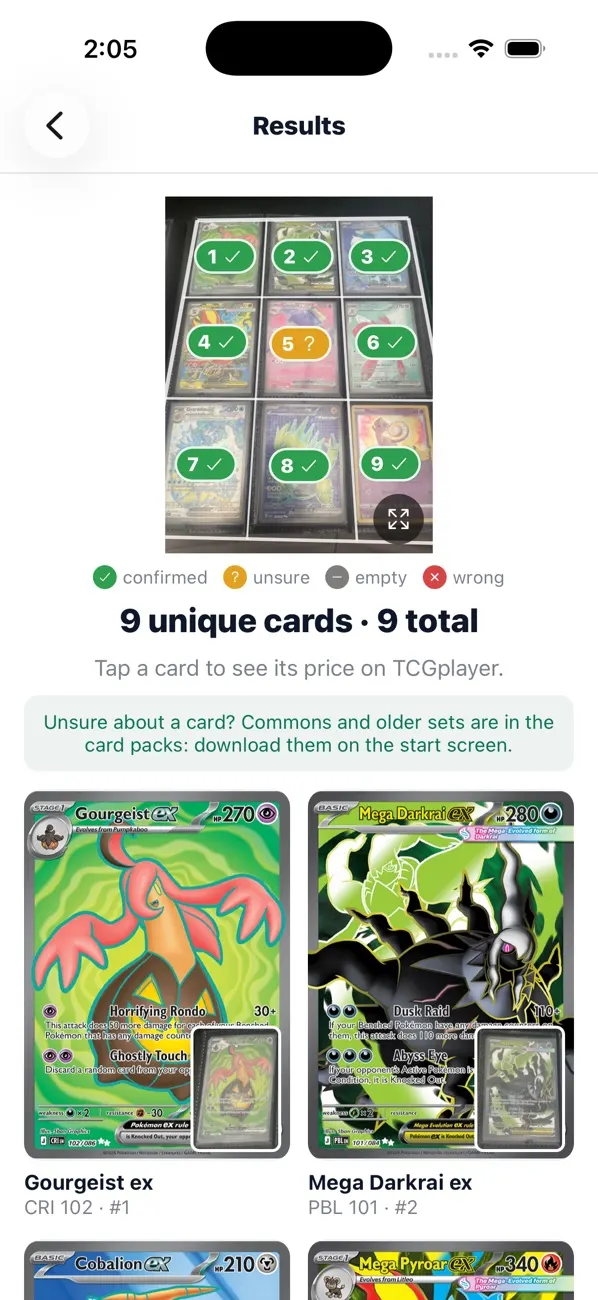
Photograph a binder page of Pokémon cards and every card is identified on the phone in about 5 seconds, with no server and no cost per scan. How it works, what moved the numbers, and the only model I trained.
 Ken Ruiz Inoue · October 2026
Collectors keep their best Pokémon cards in 9-pocket binder pages. Pricing a page means looking up every card by hand, and one card can have a dozen printings that differ only in a small number in the corner. I wanted an app that does it from one photo: find every card, name the exact printing, and open its price page.
One constraint shaped every decision: it runs entirely on the phone. No server and no API calls, so there is no cost per scan, it works offline, and photos never leave the device. The result is Another Scanner. Both repos are public, the ML pipeline and the iPhone app, and every number below is dated in the results log.
What it does
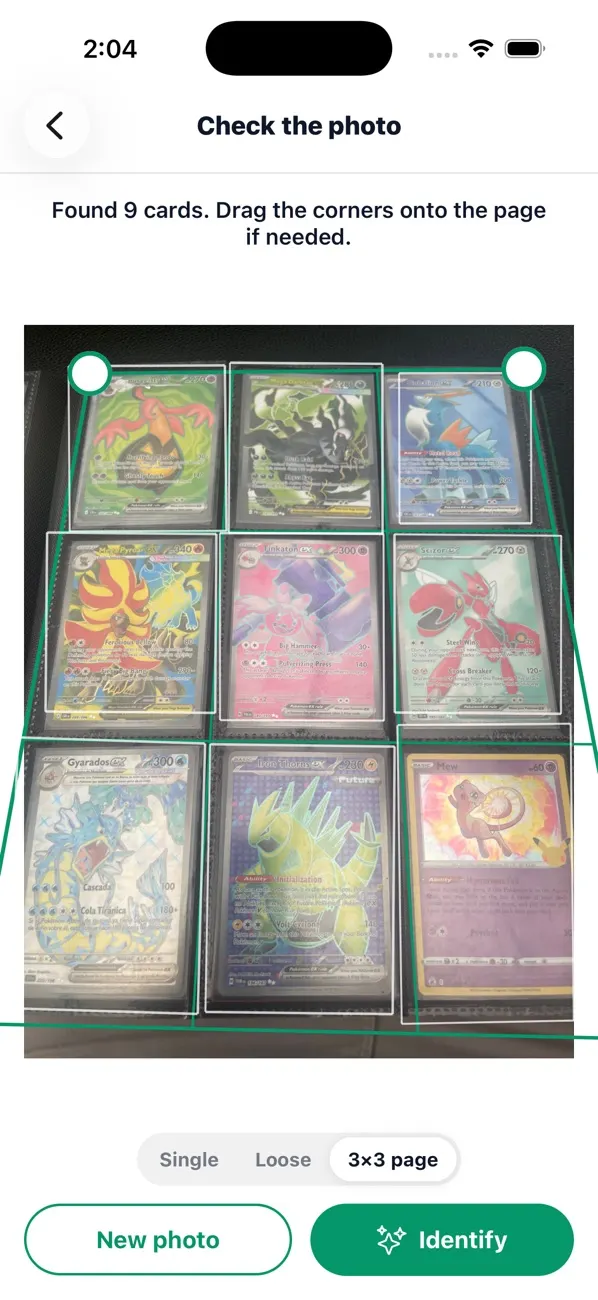
Take a photo of one card, a few loose cards or a full 3x3 page. A small detector finds every card, the app straightens each one and identifies it against a catalog of 20,953 English cards, then shows one tile per card that opens its TCGplayer page. The first tile appears in about a second and a full page takes about 5, on an iPhone 12 Pro Max.
20,953
cards in the catalog
~1 s
to the first tile
~5 s
for a full page
$0
per scan, no server
Start with the cheapest thing that could work
The first version used no training at all. An open-vocabulary detector (OWLv2) boxed the cards, and a pretrained image model turned each crop into a fingerprint: a vector of numbers compared against every catalog image. On one real binder page, ResNet18 found 4 of 8 cards and DINOv2-small found 8 of 8, so DINOv2-small became the default.
Then the real problem showed up. A nearest-neighbor matcher always returns its closest card, and cards missing from the catalog scored as high as cards in it, so no similarity threshold could say "I don't know this card". Across all 10 labeled pages, accuracy by name was 61%.
Let geometry say yes or no
A card is flat. If the photo really shows a given card, its keypoints line up with the catalog image under a single perspective warp, and a look-alike's don't. So the fingerprint only builds a shortlist, and a keypoint check decides: match keypoints, fit a homography with RANSAC (a fit that ignores outliers) and count the inliers, the matches that agree.
Two details mattered. Catalog keypoints come only from the top 60% of each card, the name and the artwork, because the bottom half is boilerplate shared by every card of an era. And verifying a shortlist turned an empty pocket into what it should be: zero inliers, no card, instead of a confident wrong answer.
The geometry check
Right by name, same 75 real cards
Wrong answers
Same 75 real cards, lower is better
The catalog was the bottleneck, not the model
The first holdout set, 11 binder pages the system was never tuned on, verified almost nothing. The cards on those pages simply were not in the catalog. Widening the catalog to every binder-worthy card, with no threshold changes, took the holdout to 65 of 86.
Today the catalog covers every English set from Base Set to the current era plus every promo TCGplayer sells, merged from three sources: TCGdex for sets and official images, pokemontcg.io for art TCGdex lacks, and TCGCSV for promos. A stamped reprint with the same art becomes a variant of its card, since no image method can tell them apart; new art becomes a new card.
Making it fit on a phone
Before writing any app code, I measured the phone configuration on the Mac. DINOv2-small exported to int8 ONNX went from 88 MB to 24 MB, with fingerprints agreeing at cosine 0.97 on average. SIFT keypoints became ORB, which is binary and fast. RANSAC was 90% of the scan time at 14 seconds a page; OpenCV's USAC fitter cut that to 1.5 seconds with the same holdout score.
The phone runs the same ONNX models through ONNX Runtime and the same keypoint code through OpenCV, and every threshold ships inside the pack in one meta.json file. That way a number measured on the Mac is a number about the app as it ships.
The only model I trained is the card detector, because nothing off the shelf fits a phone. CardNet is a MobileNetV3-Large backbone with a center heatmap plus the 4 corners of each card, about 4M parameters and 12.8 MB. It trained in about 40 minutes on 131 real photos labeled by OWLv2, mixed with synthetic layouts of catalog cards, sleeves, glare and blur. On held-out photos it finds 92% of the cards.
Fingerprint model size
Megabytes, lower is better
Keypoint fit per page
Seconds, lower is better
~4M
detector parameters
12.8 MB
card detector
~40 min
of training
92%
cards found, held out
The whole pipeline
Each card escalates only as far as it needs. Most verify at the keypoint check, in about a second; hard ones (glare, sleeves, foil) go deeper. Results stream in, so a tile appears as soon as its card settles, and the slow whole-catalog search yields between steps so finished tiles stay tappable.
- 1
Find the cards
CardNet finds the 4 corners of every card and picks the layout: one card, loose cards or a 3x3 page.
- 2
Straighten
Each card is warped to an upright 800 px crop.
- 3
Fingerprint
DINOv2-small (int8) turns the crop into 384 numbers and ranks all 20,953 cards.
- 4
Keypoint check
Passes? Stops hereThe top 30 need 12 agreeing keypoints; ranks 31 to 200 need 14.
- 5
Whole-catalog vote
Passes? Stops hereEvery card votes with 100 artwork keypoints; the 25 most voted get the full check and need 20.
- 6
Read the printed text
Last stepOnly when the match is weak, unsure or has a twin printing: the collector number, the name or an attack name settle it.
A card that passes a check stops there. Only the cards it could not verify move on to the next step.
When the picture is not enough, read the card
Some printings share identical art and differ only in the printed number. No image method can separate them, so the app reads the text with Apple Vision, free and on device, but only when the visual answer is weak, unsure, or has a known twin. Easy cards pay nothing.
The text also rescues cards the fingerprint ranks far down. A rainbow Glaceon VMAX ranked 1,287th by fingerprint; the printed text proposed it, and 33 agreeing keypoints confirmed it. When the text rules shipped, they fixed 7 answers and broke none on 270 measured crops, and later rescued 5 and confirmed 2 of 27 unverified crops with zero wrong.
A bug only the data could find
A Spanish Vikavolt came out as a Charizard. Its keypoints matched at 45 inliers, but it never reached the check: the whole-catalog vote gave it zero votes. Simulating the vote on the Mac showed why. Each card voted with its 100 strongest keypoints, and a card's strongest keypoints are the frame, the logos and the "ex" badge that every card shares. The vote was mostly boilerplate.
Voting with each card's weakest 100 keypoints instead, at the same cost and with no re-export, took the right card into the top 25 for 154 of 205 crops, up from 96. Of the 51 still missed, 27 were already verified by the earlier stages and 23 cannot be verified by keypoints at all, because of blur, glare or gold foil. The vote is no longer the bottleneck; image quality is.
Which keypoints each card votes with
Right card in the top 25, of 205 crops
Where it stands
On the phone, a tester session of 16 binder pages (139 pockets) came out with 135 right, 3 unsure and 1 wrong. On the Mac, with the phone's models and thresholds against the full catalog, the holdout pages the system was never tuned on score 73 of 86; the misses are glare rows and sparse pages.
135 of 139 right
- 135 right
- 3 unsure
- 1 wrong
| Answer key on the Mac | Result |
|---|---|
| Holdout pages, never tuned on (86 cards) | 73 right |
| Batch 3 pages (75 cards) | 75 right, 0 wrong |
How the work was run
Every change went through the same loop. The app saves each scan with the photo, the crop each model saw, every stage's evidence and the tester's notes. On the Mac I pull that log, label the truth, replay the failures, change one thing and measure it on pages it was never tuned on. The result goes in the log either way, shipped or rejected.
The rejected ideas stay in the log too: voting with the strongest keypoints, SIFT on the phone, Japanese prints. They are there so nobody tries them twice.
A change without a number does not ship.
- 1Scan on the phone
- 2Pull the scan log
- 3Label and replay
- 4Change one thing
- 5Record the number
- 6Install the new pack
Next: a loop fed by users
Today the scan log lives on a tester's phone. The next step is to make it a product feature: users can opt in to upload a scan, the photo goes to storage and the result with its evidence to a database, and the team reviews, labels and measures fixes against it. Every wrong tile becomes a test case.
Because both repos are public, that loop does not have to be closed by one team. Other developers can contribute labeled binder pages or hard cases, and every proposed change gets measured against the same answer keys before it ships.
Users scan
Collect
Label
Measure
Ship
The point
Most of the accuracy here came from engineering, not training: a pretrained fingerprint to shortlist, geometry to decide, the printed text for what the picture cannot settle, and a log that measures every change on data it has never seen. The same approach applies to most applied AI work: start cheap, measure on real inputs, fix the bottleneck the numbers point to, and train only where nothing else works.
Pokémon and Pokémon card names and images are trademarks and copyrights of Nintendo, Creatures Inc., GAME FREAK inc. and The Pokémon Company. Another Scanner is an independent open-source project and is not affiliated with, sponsored or endorsed by them or by TCGplayer.