AI engineering · 9 min read
Speech to text on an iPhone, offline, built with an AI agent in 6 steps
- speech engines
- 3
- work offline
- 2 of 3
- automated tests
- 146
- tickets, one plan
- 37
Record a meeting, lock your phone, and read it as text without internet. Three speech engines behind one switch, and the 6 step method that kept an AI coding agent on track while it built the app.
 Ken Ruiz Inoue · October 2026
I wanted an app that records a meeting or a class, keeps going with the phone in my pocket, and gives me the text afterwards, without sending the audio to a server by default. Another Transformer is that app, for iPhone, open source under the MIT license.
It was also a test of a way of working. Claude Code wrote almost all of the code, and I wanted to see how far an AI agent gets when it works inside a strict method instead of free prompting. This post covers both: how the app works, and the 6 steps that kept the agent on track.
What it does
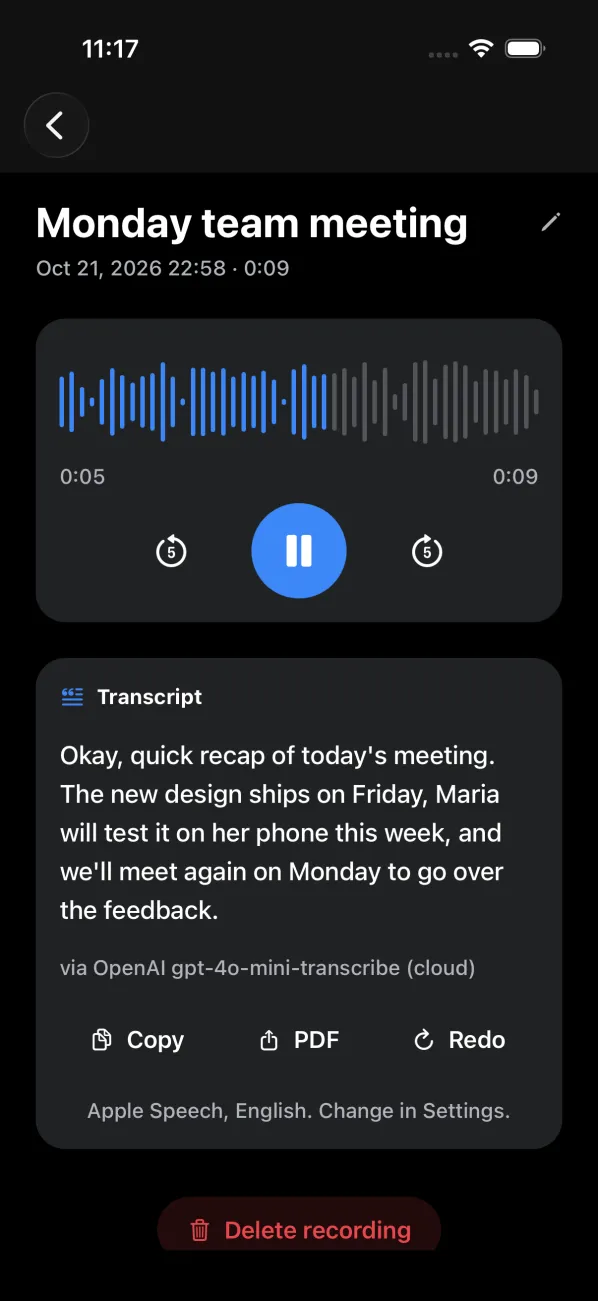
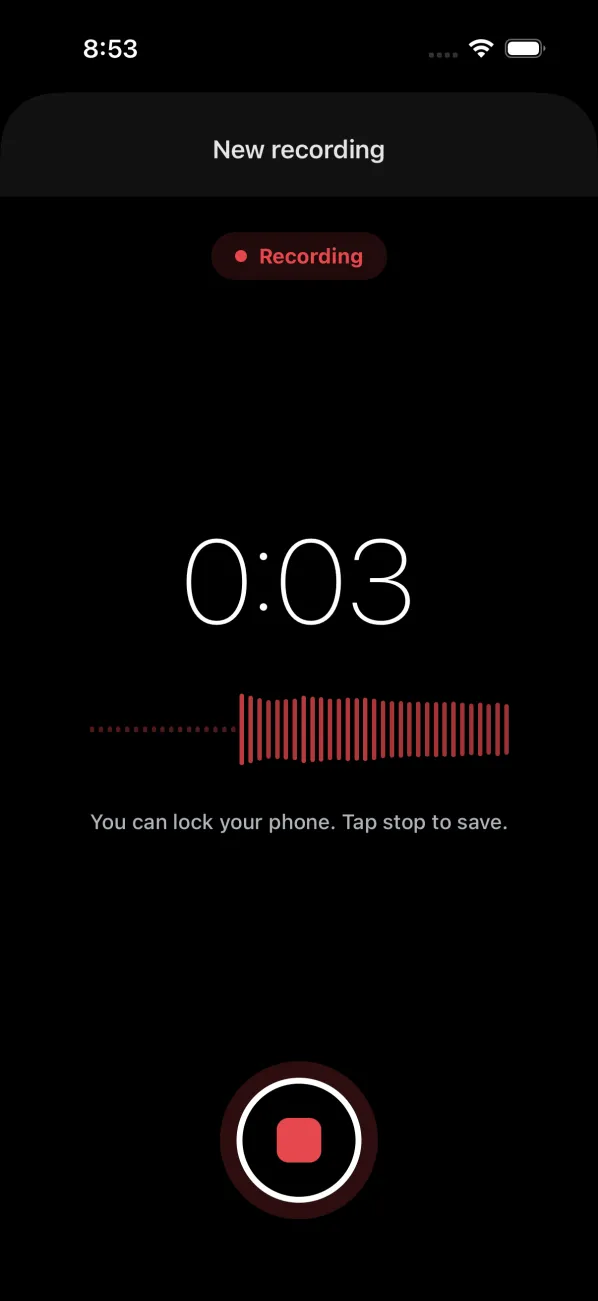
Tap record and lock the phone; recording keeps going in the background, to a 16 kHz mono WAV file. Each recording gets a title you can edit in place, plays back with its own sound wave as the seek bar, and turns into text with one tap. The text can be copied or exported as a PDF. The spoken language is set once in Settings, English, Spanish or Japanese, and every engine uses it.
3
speech engines
2 of 3
work offline
146
automated tests
37
tickets, one plan
Three engines, one interface
Apple Speech is the default: free, offline, and forced to recognize on the device, so it never falls back to Apple's servers. Whisper base is OpenAI's open model, run on the phone through whisper.cpp after a one-time 148 MB download that Settings can also delete. The cloud engine calls gpt-4o-mini-transcribe with your own OpenAI key.
All three implement the same Transcriber interface: a file in, text out. A small router picks the engine from Settings and passes the language along. The screens, the hooks and the tests only ever see that interface.
- Built into iOS
Default engine
Apple Speech
Free and offline. The app forces it to stay on the phone.
- Pretrained, used as is
Best offline quality
Whisper base
OpenAI's open model, 74M parameters, a one-time 148 MB download.
- Cloud API
Cloud option
gpt-4o-mini-transcribe
Uses your own OpenAI key. A build without a key never sends audio out.
A fallback that says what happened
Any engine can be unavailable. Whisper needs its download, OpenAI needs a key in the build, and on-device Apple Speech is not available everywhere. The router tries the picked engine first, then the others, and records why each one failed so a total failure can be explained even in a release build with no console.
Two fixes came from using it. A stalled OpenAI request could hold up the whole chain, so it now gives up after 30 seconds. And a fallback used to be silent, so the transcript now names the engine that wrote it. In one simulator test, Apple Speech was picked, could not run there, Whisper was not downloaded, and the text arrived marked "via OpenAI".
- 1
Apple Speech
Text? DoneThe engine picked in Settings goes first.
- 2
Whisper
Text? DoneNext, if its model is downloaded.
- 3
OpenAI
Last stepLast, if the build has a key. A stalled request gives up after 30 seconds.
The text shows which engine wrote it, so a silent fallback never hides a broken engine.
Recording on a locked phone
Background audio is declared in the app config, and recording runs in a gateway the screens never touch directly. While recording, the screen shows live sound bars from the microphone level, and the sheet cannot be swiped away by accident, because that used to lose the recording.
The seek bar is the recording itself: the app reads the WAV file and draws 48 bars, each the loudness of its slice of the audio. iPhone WAV files carry an extra block before the sound, so the reader walks the file's chunks instead of assuming a fixed header.
The method, step by step
An AI agent can write a feature in minutes. The risk is not speed, it is drift: code that works today and quietly breaks the shape of the project. These 6 steps are how I keep an agent inside the lines, and they apply to any project, not only mobile apps.
Rules first
Questions
Small tickets
Test first
Audit
Approve
Steps 1 and 2. Rules first, questions before code
The agent starts every session by reading a short set of rules: how the code is structured, how tests are written, how secrets are handled, and that nothing is committed without asking. They live in the repo, so every session starts from the same page instead of from memory.
Before any code, the agent reads the requirement, splits must-haves from nice-to-haves, and lists every unclear point with a proposed answer. I confirm or change each one. These are four of the decisions it made up front.
| Open question | Decided up front |
|---|---|
| Text to audio too? | Later, not now |
| What if an engine fails? | Try the next one |
| Where does the key live? | A local file, not git |
| Full app tests on each change? | No, on a device |
Step 3. A plan of small tickets
The plan is a file in the repo: phases, and tickets inside them. Every ticket has a goal, the tests to write first, the edge cases, and the acceptance criteria that say when it is done. Ticket 6, for example: record 16 kHz mono audio and save it; a stop with no recording does nothing; an empty recording is thrown away; done when the recording tests pass.
It started at 23 tickets in 6 phases and grew to 37 in 11 as the app met reality. A phase is not done until its checks are green.
37
tickets
11
phases
23
tickets on day 1
32
done in 10 days
Step 4. Test first, one ticket at a time
For each ticket the agent writes a failing test, then the code that makes it pass, then runs every check, updates the plan, and stops for review. Native modules like the microphone and the speech engines sit behind gateways, so tests inject fakes and run on any computer.
Every push runs the same checks in GitHub Actions: lint, a type check, the 146 Jest tests, and a script that fails the build if code that touches the phone's hardware appears outside its three folders. Full user flows run with Maestro, locally, on a device or simulator; Maestro replaced Detox halfway through.
Done is something a machine checks, not something the agent claims.
- 1Write a failing test
- 2Write the code
- 3Run every check
- 4Update the plan
- 5Stop for review
Step 5. Audit every phase, then a real phone
At the end of each phase the agent lists the inputs, states and failure paths no test covers yet: an empty recording, the phone locking mid-recording, Whisper not downloaded, no key in the build, a very long recording. It adds tests for the real gaps and fixes what they expose.
Then the app goes on a real iPhone, which finds what no test runner can. Where a test can catch the bug, the fix comes with one, so it stays fixed.
| Found on the iPhone | Why tests missed it |
|---|---|
| "undefined:undefined" titles | Its dates work differently |
| Record button behind the tabs | Tests never see screen edges |
| A stalled cloud request | Test networks always answer |
| A button stuck to the left | Tests check what, not where |
Step 6. A human yes at every step
The agent pauses after the questions, after the plan, and after every ticket. It never commits on its own; I review, and I say when something goes into the history. Secrets follow the same rule: the OpenAI key lives in a local file that is never committed.
One honest limit: an app reads its key at build time, so a key baked into a build can be pulled out of it. That is fine for your own build on your own phone, which is what the cloud engine is for. A public release would send that request through a server instead.
What is next
The repo already holds a benchmark protocol for comparing the three engines on the same recordings: word error rate, time to text and cost, in English, Spanish and Japanese, in quiet and noisy rooms. Running it on real voices is the last open ticket. Text to audio was left out of this plan on purpose and may come later.
The point
Most of the value here came from the method, not the model. An agent that reads the rules, asks before it builds, works one tested ticket at a time and waits for a human yes produced an app I trust, and the real iPhone still found what the tests could not. Fast code is cheap now; the guardrails are the work.